






October 2026 Update Re: How to Renew Discourses & SATs
Dear MSIA Student,
We’re glad to share that renewing your Discourses and SATs is about to get simpler. Within the next few weeks, renewals will move to a new section of the online Student Dashboard, designed to show you exactly what’s right for you, so renewing feels less like guesswork and more like a natural next step in your studies.
A New Home for Renewing
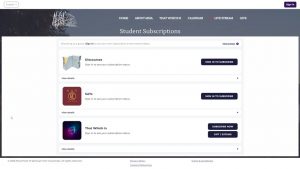
You’ll do this through your own personalized Subscription “Portal,” in the Student Subscriptions section of your online dashboard, connected directly to your student record. This means it already knows what Discourse year you’re reading or if SATs are due for renewal, so you’ll see only the options that apply to you, no more sifting through a bunch of options that may not apply. You’ll also be able to see when your subscriptions expire, so you’ll always know when a renewal is coming up, well before it does. All your subscriptions, Discourses, SATs, and even TWI, will be accessible together in one place, and you can learn about all the languages they are available in: English, Spanish, Portuguese, French, and Bulgarian.
Want to see it for yourself? Click HERE to see quick preview video of what to expect.
The next time you go to Shop at the top of msia.org, you might be asked whether you’re looking to shop products or to subscribe, and that second option will take you to your new Student Subscriptions.
A Few Things to Know Before You Renew
• You’ll need to log in. If you routinely log on to MSIA.org, you’ll use the same login you already have. No further action is needed. If you’ve never created one before and have always checked out as a guest through the online store, you’ll need to create an MSIA username and password first, it takes just a couple of minutes, and it’s a one-time step. When you do, be sure to use the same email address already on file with MSIA, this helps your new login connect smoothly to your student record. Then allow one business day for it to sync to your student record in the MSIA offices.
• Purchases are now tied to your own account. If you’d like to renew on behalf of a spouse or child, or gift a subscription to someone else, our Products and Services team is happy to help. Email order@msia.org or call (323) 737-4055.
• Everything else stays familiar. Your renewal dates, your rates, and your options are the same, they’re just easier to find now.
Make Sure You’re Ready
If you’ve never created an MSIA student login, we’d encourage you to set one up now, before your next renewal, so it’s one less thing to think about when the time comes: Get Started
We’ve also put together a series of articles covering everything from renewal timing to shipping to your Family Rate eligibility, in case you have questions along the way: Help Center > Subscriptions
 With Love & Light,
The MSIA Products & Services Team